Tag: camera

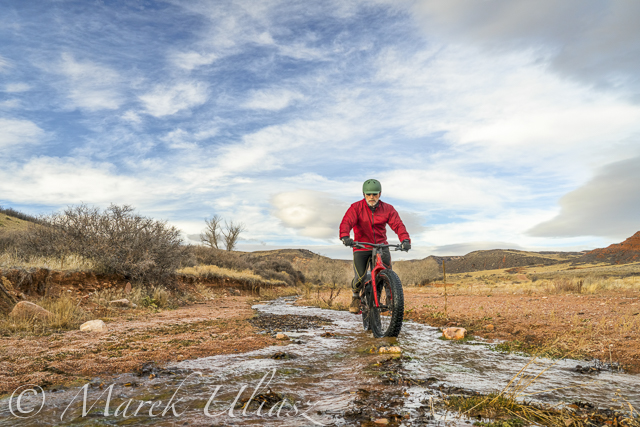
  • Water in Red Mountain Open Space – Fat Bike Exploration

    Water in Red Mountain Open Space – Fat Bike Exploration

    As a paddler I am always looking for water. Anytime! Anywhere!

    In November 2017 I made several visits to Red Mountain Open Space north of Fort Collins with my new Salsa Mukluk fat bike. I covered all possible trails. Technically, they are easy except some soft gravel and sand (many trails are going simply on dry stream beds or washes). I also did two loops in Soapstone Prairie Natural Area next door. You can check Red Mountain trails on MTB Project.

    And, I’ve found some water – not enough for paddling, but plenty for my photography. Here is a little picture story which includes also some images from earlier hiking.

    Sand Creek flows across the entire Red Mountain Open Space. You cannot ride a bike through this spectacular canyon. The Bent Rock Trail is for hiking only.
    Crossing the Sand Creek at high water may be a challenge, especially, along the Ruby Wash Trail where there are no stepping stones.
    Above the canyon, there is a little retention reservoir which turns into marsh in a dry season. Birds love it.
    If you ride the K-Lynn Cameron Trail you have chance to cross the Sand Creek twice and a few more times a smaller creek.
    Why not to ride along the creek? Well, let’s stay on the trail.
    It is difficult to catch water in Red Mountain in the form of snow since the area is closing for winter (December-February). I also believe that this area is getting less precipitation than Fort Collins. Anybody has some data?
    In the middle of November I had patches of snow in the Ruby Wash and some drift snow along the Cheyenne Rim.
    My favorite drinking hole at the top of Salt Lick Trail. I just cannot pass it without shooting some pictures. A sunset photo session means a crazy ride down on soft gravel of the Ruby Wash with a falling darkness. A fat bike is doing a pretty good job in these conditions. There are more water tanks for cattle in the area which is an active open range.
    A little bit of liquid gold – a stream disappearing at the bottom of Ruby Wash
    Of course, water shaped all canyons, arroyos and washes here, but that’s another story.
    Here is my Salsa Mukluk bike on slickrock at the upper Ruby Wash
    All pictures were shot with the mirrorless Sony A7R2 camera with Sony 24-70mm lens. The camera is mounted on a light Gitzo Mountaineer Tripod. This is my minimalist camera set for biking. I carry the camera and tripod in MindShift Rotation 180 Trail backpack.

    For hiking I usually take a heavier tripod and, perhaps, one more lens (wide angle or telephoto) in the same backpack.

    I am still trying to figure out how to carry the tripod on a bike. Handlebar, perhaps? In my other bikes, the tripod travels on rear racks.

    Related posts:
    10 pictures from Fat Bike Riding in Northern Colorado
    Searching for Paddling Water in Southern Colorado – Part 1 and Part 2
    Where to buy and license my pictures and video footage

  • Late Summer Stand Up Paddling with Olympus TG-5 Camera

    Late Summer Stand Up Paddling with Olympus TG-5 Camera

    After paddling a heavy expedition paddleboard in Missouri River 340 race I returned back to my racing board – 14×30 All Star by Starboard. It is definitely more fun for short 4-6 mile workouts. Of course, I wonder how my race would go in this racing board. I will be posting the race analysis in the Fitness Paddling blog.

    I am paddling on my local waters in Fort Collins: Horsetooth Reservoir (water level is dropping down) and Beaver Pond in Arapaho Bend Natural Area.

    I didn’t do any serious paddling photography lately, but I always carry Olympus Stylus TG-5 waterproof camera with me. Below is another series of pictures – just trying different camera angles as a break from a paddling workout. You are welcome to check the previous posts for pictures shot around the MR340 race.

    All pictures were shot in aperture mode with some exposure correction (typically somewhat underexposed). I am recording images in RAW format, and then processing them in Adobe Lightroom, and sometimes, in Photoshop if I need to remove something or apply more advanced corrections.

    I am adding these pictures to my stock photography portfolio.

    What camera are you using for paddling? A regular point and shoot camera, a waterproof one, GoPro Hero, a smartphone?

    stand up paddleboard and sunflowers
    Sunflowers on the shore of Beaver Pond in Arapaho Bend Natural Area
    Soldier Cove at Horsetooth Reservoir. You need a waterproof for this low angle shot.
    Another low angle shot, but at Beaver Pond in Arapaho Bend Natural Area.
    Just a different angle …
    paddleboard on Horsetooth Reservoir
    Horsetooth Reservoir during Labor Day weekend. It was calm and quiet until sunrise. Then, I had a good training in crazy boat wakes.

  • 10 Tips How to Avoid Blurry Pictures when Shooting from a Kayak

    Compact waterproof digital cameras like Pentax (Ricoh) Optio WG-series or Olympus Tough series are popular among paddlers. They may not offer the highest image quality among point-and-shoot cameras, but they still produce decent pictures. Most importantly, you can photograph in conditions where other cameras are better kept in a dry case or box.

    However, new camera owners are often getting pretty bad, blurry pictures and are really disappointed with a purchase. Shooting on water from a kayak or canoe requires some extra efforts and practice from a paddling photographer. Here are a few tips which may help. This is an update of my old post written 5 years ago. Cameras are getting better, but, I believe, the tips below are still valid. I have been using Pentax Optio waterproof cameras starting from the original model WP, then W10, W30, and, currently, WG2 is attached to my life jacket.

    1. Use the automatic mode

    I do not have any special settings for my camera. On water I use exclusively the P (program) mode. Of course, in addition to the P mode I use the movie mode and interval drive mode quite often.

    You can program the green button to do useful adjustments without a need to go through a setup menu. I am using two functions assigned to the green button: exposure correction and, much less often, white balance setups. Typically, I underexpose my shots to avoid overexposed areas with wash out details. Coincidentally, it shortens the exposure time which helps to avoid blurry pictures, but this is not a main purpose of this adjustment.

    2. Keep the camera steady

    This is the most important tip. However, it is not so easy when paddling, especially, when water is not calm. Ideally, you should hold the camera in both hands. In addition, it is quite easy to shake the light and small camera just by pressing a shutter button.

    3. Use a paddle shaft to stabilize the camera

    Here is a short video clip demonstrating how I am doing it.

    This technique really helped me when I was starting to paddle a tippy Sisson Nucleus kayak. You can achieve two goals: to stabilize the camera and to stabilize your kayak. You have your paddle ready for bracing. This technique does not work with strong, gusty winds.

    You can go further with this idea and attach or mount your the camera more permanently to your paddle – see a camera cradle by Mark Sanders.

    4. Use a self timer

    The 2 second selftimer available in Pentax Optio is very useful to avoid shaking the camera when pressing the shutter button. I recommend it, especially, when you are holding the camera with one hand (shooting on an extended arm or from some unusual angles).

    5. Keep your lens clean of condensation, water drops, water residue

    I keep my camera in a small neoprene pouch attached to my life jacket and usually do not have problems with water or dirt on my lens. The camera is always on a tether. Shooting with a camera mounted on a deck and exposed to splashes is another story.

    6. Pay attention to light and sun position

    Try to shade you camera lens from a direct sunlight to avoid a lens flare. Do not shoot against the sun.

    It is possible, at least for Pentax, to glue (epoxy) some step-up rings and to attach lens hood to your camera. I am using much simpler solution: an improvised lens hood attached with an electric tape to the camera.

    You can expect the best “sweet” light for shooting when the sun is low, so after the sunrise and before sunset. Do not expect too much from this camera in low light conditions, but do not give up with shooting as soon as the sun is down. Consider shooting some silhouettes or water reflections then.

    7. Use flash

    Sometimes, I use flash to add light to objects in my fore plan. Usually, a soft flash option works better for a kayak deck. Be aware of any reflective tape on your kayak or gear.

    8. Shoot multiple frames

    Don’t limit yourself to a single shot for a given scene. Repeat the shot. Try different angles, horizontal and vertical format. You will increase your chances to get that great shot. Digital memory is cheap. You can always erase unsuccessful pictures later.

    9. Photoshop …

    Downloading pictures from the camera to your computer is not the end of your work as a photographer.
    Use Photoshop or other image editing software to post process your pictures. Most often, I rotate my pictures to make horizon horizontal, adjust the exposure with levels, crop and resize them, and, finally, apply some sharpening. You cannot save completely blurred pictures in Photoshop, but you can improve most of them.

    10. Practise

    There are no reasons not to take and use the camera wherever you go. It is small and waterproof. Experiment and have fun.

    Time to to time it is useful to browse through the camera manual. You may find something new and exciting in a jungle of all these options and settings.

    More tips?

    Could you share tips from your experience with a kayak or canoe photography? Are your on water pictures worse than these shot on land?
  • Paddling CLC Patuxent Kayak with a Telescoping Camera Mast

    Paddling CLC Patuxent Kayak with a Telescoping Camera Mast


    April 2010. Paddling CLC Patuxent 19.5 kayak with Canon Powershot G11 camera mounted on a telescoping mast assembled from a monopod and sticky pod platform.

    Related post:
    Paddling with Canon PowerShot G11 Camera on a Monopod Mast
    Kayak Video Camera Mast – Sticky Pod Combined with Monopod
    A Bird’s-Eye View of Kayaking with GoPro Hero Camera

  • Canon EOS 40D Camera on the Bow of a Racing Kayak

    I always carry one of my waterproof Pentax Optiocameras attached to a life jacket to document my paddling trips and races. The image quality is fine to display pictures on-line, but it may be not sufficient for commercial applications. Pictures shot with compact digital cameras usually show a lot of digital noise when examining at 100% view.

    In November 2007 I started to sell my pictures through microstock agencies. It forced me to carry a DSLR camera for paddling trips. It is a little bit tricky in the case of a low volume racing kayak like my Thunderbolt-X. Most often, I just pack a camera with a tripod and shoot from land. However, I am also trying to shoot from a kayak cockpit or from a decked mounted camera.

    This is the original my sticky pod, a camera mount with 3 suction cups, modified by adding a 1/4″ bolt. It is the same platform I am using for my telescoping video camera mast.

    Now, we can add a tripod head. I am showing here my old 3-way Manfrotto/Bogen head great for shooting video. It provides much smoother controls and more solid mount than a simple knuckle coming with the sticky pod.

    Canon EOS 40D camera with EF-S 17-55mm f/2.8 IS USM lensmounted on a front deck of my Thunderbolt-X kayak. This is my favorite lens for paddling or any shooting restricted to a single lens.

    A wing paddle can be really wet… To protect the camera from splashes I am using a rain coat with a front glass from Ewa Marine. I bought it years ago for my camcorder and it fits pretty well my DSLR camera as well. I was not able to use the original lens hood inside this cover without vignetting, so I improvised a temporary paper hood.

    Canon TC80N3 Timer Remote Controler attached to the camera also fits under the rain coat. It allows me to shoot pictures automatically with a desired frequency and delay.

    This camera setup is pretty heavy and affects stability of the tippy Thunderbolt kayak! It is even more challenging if I move it forward to a narrow kayak bow. I would not leave it alone mounted on an empty kayak.

    One of the pictures shot from the camera mounted in the front of the kayak cockpit on the Beaver Pond near Fort Collins. The light and scenery is not so great, but the camera setup work as expected. This picture is available for purchase from Featurepics.

    Another shot looking backward from the kayak bow. Of course, this camera setup can be used only on calm water. The rain coat doesn’t protect a camera from waves or splashes coming from below. This picture is available for purchase from Featurepics

    I am not really recommending it for use with racing kayaks, but it is not so risky with more stable and drier boats. I used this camera setup even without the rain coat on the front deck of Sea Wind canoe.


  • Kayak Video Camera Mast – Sticky Pod Combined with Monopod

    As many other paddlers I was inspired by a video camera setup used by Justine Curgenven in her This Is The Sea DVD series. So, last year, I started to experiment with my own mast for kayak photography and video. My idea was to combine the sticky pod suction cup camera mount with a telescoping 50′ monopod. However, I did not want to make any permanent modifications to my rather expensive, 6 segment Carbon Fiber Traveler Monopod by Gitzo. It is just another job for my Gitzo.

    This is “my sticky pod” – a camera mount with 3 suction cups. It comes with a mounting 3/8″ bolt. My Gitzo monopod and photo tripod heads have 1/4″ sockets, so I drilled an extra hole and I added 1/4″ bolt. The first thing I added was a tether!

    Note that the original bolts and rivets are getting a little bit rusty. It would be nice to have stainless hardware for a wet environment. The triangular base is made of aluminum.


    I removed a head from my Gitzo monopod and screwed it upside down to the sticky pod. You can use any monopod, just be sure that is has 3/8″ or 1/4″ socket. Aluminum monopods are not very expensive, starting around $20.

    Now, we need to attach a camera to the other side (i.e., normally bottom) of the monopod. As a temporary solution I used a small toy tripod with flexible legs and some plastic wraps. I believe I got that tripod together with a memory card order.

    Here is my camera, Pentax Optio W30, mounted on the mast. Don’t forget a tether!

    I added a temporary lens hood a year ago. It’s ugly, but it works protecting the lens against direct sun and water splashes.

    Flexible legs of the little tripod allow me to adjust camera position. I can shoot in both landscape and portrait mode. It’s not very robust solution however. For rough conditions I would use more solid mount to prevent camera movement or just more plastic wraps or even a duct tape.

    The camera mast mounted on the stern deck of my Thunderbolt-X kayak. It is almost fully extended and even with a light Pentax Optio camera affects stability of my tippy kayak. A few inches lower and the kayak behaves much better.

    One example of picture shot from the back deck with a fully extended mast – paddling Thunderbolt kayak on Beaver Pond near Fort Collins. Pentax Optio W30 was set in an interval mode and was shooting pictures every 10 seconds. I was shooting with a similar camera setup last year on the Horsetooth Reservoir, but the camera was mounted much closer to a paddler.

    It is a little bit tricky to set up a camera at that tall mast without looking at a LCD monitor. Perhaps, a small mirror would be helpful.


  • Panasonic Lumix DMC-TS1 – New Waterproof Camera with Optical Image Stabilizer

    Panasonic is entering a market for compact waterproof cameras represented by popular Pentax Optio W and Olympus Stylus SW series.

    Lumix DMC-TS1 is waterproof to 3 m (9.84 ft), dustproof and shockproof. The camera features Leica DC Vario-Elmar lens with zoom from 28 mm to 180 mm (35 mm format equivalent) with, I believe, the first optical image stabilizer in this type of a compact camera.

    Video options looks also promising:

    The TS1 records HD motion images with 1280 x 720-pixel resolution. It uses the AVCHD (MPEG-4/H.264) format, via AVCHD Lite which stores less data than other formats and thus lets you shoot more minutes of HD motion images before running out of memory.

    The camera will be available in April 2009. The price listed at amazon.com is $399. You can buy it in different colors: silver, orange, and green.

    It looks like a good paddling camera. I will be looking for reviews of Lumix DMC-TS1.

    Waterproof Cameras for Paddlers (a shopping guide)

    Olympus 1030SW, 1050SW, Pentax Optio W30, W60 – Comparison of Waterproof Cameras

    Poll: Your Paddling Camera

  • My Collection of Pentax Optio Waterproof Cameras


    start of Texas Water Safari


    Suwannee River sunrise


    Missouri River


    South Platte River


    interval shooting mode


    South Platte River Colorado

    see Pentax Optio W60 at Amazon

    My collection of waterproof Pentax Optio cameras for paddling and outdoor photography includes three models:

    Pentax Optio WP

    April, 2005.
    I had been thinking for a longer while about taking a camera for Texas Water Safari, 260 mile non stop race down the San Marcos and Guadelupe Rivers. My first digital camera, Canon PowerShot S40 in its waterproof case was just too heavy to carry it through all portages and logjams of the race. So, I bought Pentax Optio WP, the first waterproof compact digital camera, as soon as it was available.

    I started with placing the camera in a glass of water … You can check my first impressions from paddling and shooting with Optio WP. The camera worked pretty for all training and, eventually, the Safari, though I shot fewer pictures than I hoped to. One of the pictures from the start line up was published in Adventure Sports Magazine.

    I shot over 1000 pictures with the Optio WP in March 2006 during the WaterTribe Ultimate Florida Challenge.

    Pentax Optio W10

    May, 2006.
    A year later, the camera still worked fine, but, occasionally, used to freeze and the only cure was to disconnect a battery. I decided to upgrade to the Pentax Optio W10. The main motivation for the upgrade were better video capabilities. I carried the W10 for all my paddling, training, and racing. It was used to cover 2006 and 2007 Missouri River 340 races and 2007 Glenwood Canyon race. I shot numerous video clips and pictures from a deck mounted camera.

    Pentax Optio W30

    December 2007.
    I realized that the Optio W10 camera may, finally, die after my intense use and abuse, and that I need a backup camera. I considered for a while GoPro Digital Hero camera for its video capabilities, but decided for another Pentax Optio W10 since still pictures were more important for me than video.

    Then, I found that I could buy the newest model Optio W30 cheaper than the W10 (less than $200 including mail rebate at Amazon). So, I ended up with the Optio W30.

    I paddled the entire winter shooting with Optio W30 from my Thunderbolt kayak on the South Platte River, shot animation from the Wyoming Outback Challnege and many pictures during 2008 Missouri River 340 Race.

    I still need to experiment with installing a filter mount on one of my Optio cameras.

    Pentax Optio W60

    May 2008.
    Pentax is releasing Optio W60 … No, I didn’t buy W60. Optio W30 is working just fine for my paddling needs, and I am rather saving money for some investments in DSLR cameras. It may take a longer while since Canon EOS 5D Mark II with video capabilities is on my wish list.

    Related posts:


    Technorati tags:


  • Canon PowerShot G10 with Waterproof Case for Paddling?

    I am quite happy to paddle and shoot with Pentax Optio “W” cameras as long as producing pictures to be displayed online. They are waterproof, compact, easily accessible in any conditions. The image quality is OK for a blog or website, but usually there is just too much of digital noise for some commercial applications. So, for my stock photography, I am carrying a DSLR camera, Canon EOS 40D. It may be a rather challenging task if I paddle a racing boat like my Thunderbolt-X kayak.

    In the search for some alternative solutions I have been watching evolution of Canon PowerShot G series cameras. Canon offers waterproof cases for them.

    The newest Canon G10 certainly looks interesting, and arguably, it may be the best compact digital camera available. It’s not cheap: ~$420 for the camera and ~$190 for the waterproof case at amazon.com.

    I have been spoiled by Pentax Optio W10 and W30 cameras with the interval (time lapse) shooting mode. Now, I would like to see that feature in any camera. No luck with the Canon G10, though. However, there is some hope to control this camera remotely since it accepts the same shutter remote as Canon Rebel. How to deal with the waterproof case with the remote attached is a different story.

    canon powershot g10

    Here are some reviews of Canon G10.

    Trusted Reviews:
    “The Canon PowerShot G10 is still going to be the benchmark by which all other high-spec compacts are measured, but it’s no longer the top dog. It is beaten on picture quality and portability by the smaller, lighter and slightly cheaper Panasonic LX3, and is beaten badly on value for money by most entry-level DSLRs. It’s still an impressive camera and can produce excellent results, especially in Raw mode, but the price means its appeal is a little too specialised for some.”

    Digital Camera Review:
    “At the moment, the advanced compact camera market has settled in terms of price at around the $500 mark. For that kind of outlay, it’s not unreasonable to ask yourself whether your needs might not be better served by an entry-level DSLR: basic models from every manufacturer will do essentially everything the G10 does, provide superior high-ISO and shooting speed performance without exception, and do so for only a little more than this PowerShot’s considerable price tag (not to mention that the G10 weighs almost as much as many of these larger cameras).”

    The Online Photographer:
    Canon has now demonstrated that a small camera with a small sensor can provide the ergonomics, speed, flexibility, and image quality that would please most serious photographers.

    CNET editors’ review:
    The primary reason to buy a camera like this, however, is the photo quality, and here the Canon G10 doesn’t disappoint. Color and exposures are great. There’s some wide-angle distortion at the 28mm-equivalent maximum, but photos have very good center and edge-to-edge sharpness at longer focal lengths. ISO 80 and 100 produce relatively pristine images and if you’re alert to it, you’ll see some noise-suppression artifacts starting at ISO 200. But photos look quite usable up to and including ISO 400; at ISO 800 they get visibly soft.

    Luminuous Landscape: Comparison of Canon G10 and Nikon P6000.

    byThom: Comparison of Canon PowerShot G10, Nikon Coolpix P6000, and the Panasonic Lumix DMC-LX3.
    “If you need pixels, you need the Canon, hands down. If you need the fast, wide, defect-free lens, you need the Panasonic. You don’t need the Coolpix.”

    Ken Rockwell
    “The G10 is the best compact digital camera I’ve ever used, but no compact is as good as any real (interchangeable-lens) SLR.”