Tag: waterproof

  • Olympus Tough TG-5 Compact Waterproof Paddling Camera

    Olympus Tough TG-5 Compact Waterproof Paddling Camera

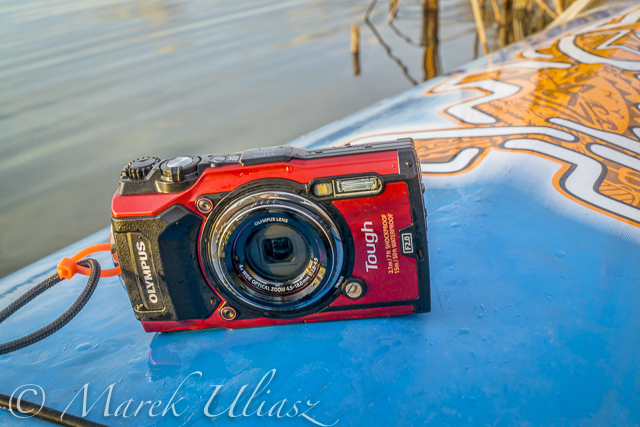
    Waterproof Olympus Stylus Tough TG-5 camera
    Waterproof Olympus Stylus Tough TG-5 camera on a deck of All Star paddleboard.

    A few weeks ago I upgraded my paddling camera to waterproof and rugged Olympus Stylus TG-5 . It’s the follow-up to the Olympus STYLUS Tough TG-4 and features a new sensor and processor (but reduced resolution), advanced tracking capabilities, 4K video capture, Wi-Fi.

    I’ve been using waterproof cameras from Pentax Optio series for years. The last one was Pentax Optio WG-2. It was followed by Ricoh WG-30w. I understand that these cameras are now discontinued, but you can still find them or newer versions on Amazon.

    My main reason to buy Olympus TG-5 camera was its ability to record images in RAW format. I like to have a full control over processing my pictures in Lightroom and/or Photoshop.

    I am not often using my iPhone when paddling. Typically, the iPhone is hidden in a dry bag or I am saving its battery for communication in longer trips like MR 340 race. BTW, you can get images in RAW format from your iPhone when using the mobile Lightroom app.

    You can find many reviews of the TG-5 camera online, e.g.,

    New Olympus TG-5 improves ‘toughness’, brings new sensor and tracking functionality. DPreview.com.

    There isn’t a better rugged waterproof compact around than the Olympus TOUGH TG-5. Like all great cameras it gets the basics right – a bright, good quality 25-100mm f2 – 4.9 lens paired with a quality 12 Megapixel sensor and high performance TruePic VIII processor. It builds on that with a great set of features and shooting modes, including Pro capture continuous shooting, 4K video, RAW support, and superb macro modes. Finally, it provides the control you need to make the most of those features, whatever the environment. The only downside is the poor performance of the movie continuous AF. CameraLabs.com

    I’ve got the camera just a few days before the 12th Missouri River 340 Race (nonstop paddling race from Kansas City to St Charles). I had only time to figure out how to use aperture mode with exposure compensation and ISO adjustment. Here are some pictures shot before, during, and after the race. The pictures on the Missouri River were shot with a harsh afternoon light while other with a much nicer morning light.

    Half underwater picture of Starboard Expedition SUP on Horsetooth Reservoir, CO.
    Starboard Expedition 14×30 stand up paddleboard during my last training workout on Horsetooth Reservoir before MR340 race.
    Half underwater picture of Starboard Expedition SUP on Horsetooth Reservoir, CO.
    Half underwater picture of Starboard Expedition SUP on Horsetooth Reservoir, CO.
    Stand up paddleboard in Missouri RIver 340 race
    Paddle, paddle, paddle – my mantra during the race (wisdom words by Verlen Kruger).
    Stand up paddleboard in Missouri River 340 race
    Dundee sandbar – the last rest stop before reaching race finish at St Charles – 48 miles to go.
    Starboard expedition at the finish of MR340 race
    Starboard expedition with the lucky number 13 at the finish of MR340 race in St Charles, MO. I’ve been using boat number 13 in all my Texas Water Safari runs, and then the number 0013 in all 10 MR340 races.
    My shuttle after MR340 race; the paddleboard in at a hotel in St Charles, the car is at a hotel in Kansas City, and I am boarding Amtrak River Runner at Kirkwood, MO
    My shuttle after MR340 race; the paddleboard in at a hotel in St Charles, the car is at a hotel in Kansas City, and I am boarding Amtrak River Runner at Kirkwood, MO
    Back to Colorado – rinsing Missouri River mud in Horsetooth Reservoir

    I believe that image quality is pretty decent, good enough to include images in my stock photography portfolio, and certainly for web publishing.

    Now the big race is over. I will have some time for a more relaxed paddling and photography. I am going to compare Olympus TG-5 to my old Pentax Optio, and perhaps, to GoPro HERO camera.

    I wonder if anybody is still using this type of waterproof camera for paddling and other outdoor activities in the age of a smartphone. So, what camera are you using? Please share your experience.

  • 10 Tips How to Avoid Blurry Pictures when Shooting from a Kayak

    Compact waterproof digital cameras like Pentax (Ricoh) Optio WG-series or Olympus Tough series are popular among paddlers. They may not offer the highest image quality among point-and-shoot cameras, but they still produce decent pictures. Most importantly, you can photograph in conditions where other cameras are better kept in a dry case or box.

    However, new camera owners are often getting pretty bad, blurry pictures and are really disappointed with a purchase. Shooting on water from a kayak or canoe requires some extra efforts and practice from a paddling photographer. Here are a few tips which may help. This is an update of my old post written 5 years ago. Cameras are getting better, but, I believe, the tips below are still valid. I have been using Pentax Optio waterproof cameras starting from the original model WP, then W10, W30, and, currently, WG2 is attached to my life jacket.

    1. Use the automatic mode

    I do not have any special settings for my camera. On water I use exclusively the P (program) mode. Of course, in addition to the P mode I use the movie mode and interval drive mode quite often.

    You can program the green button to do useful adjustments without a need to go through a setup menu. I am using two functions assigned to the green button: exposure correction and, much less often, white balance setups. Typically, I underexpose my shots to avoid overexposed areas with wash out details. Coincidentally, it shortens the exposure time which helps to avoid blurry pictures, but this is not a main purpose of this adjustment.

    2. Keep the camera steady

    This is the most important tip. However, it is not so easy when paddling, especially, when water is not calm. Ideally, you should hold the camera in both hands. In addition, it is quite easy to shake the light and small camera just by pressing a shutter button.

    3. Use a paddle shaft to stabilize the camera

    Here is a short video clip demonstrating how I am doing it.

    This technique really helped me when I was starting to paddle a tippy Sisson Nucleus kayak. You can achieve two goals: to stabilize the camera and to stabilize your kayak. You have your paddle ready for bracing. This technique does not work with strong, gusty winds.

    You can go further with this idea and attach or mount your the camera more permanently to your paddle – see a camera cradle by Mark Sanders.

    4. Use a self timer

    The 2 second selftimer available in Pentax Optio is very useful to avoid shaking the camera when pressing the shutter button. I recommend it, especially, when you are holding the camera with one hand (shooting on an extended arm or from some unusual angles).

    5. Keep your lens clean of condensation, water drops, water residue

    I keep my camera in a small neoprene pouch attached to my life jacket and usually do not have problems with water or dirt on my lens. The camera is always on a tether. Shooting with a camera mounted on a deck and exposed to splashes is another story.

    6. Pay attention to light and sun position

    Try to shade you camera lens from a direct sunlight to avoid a lens flare. Do not shoot against the sun.

    It is possible, at least for Pentax, to glue (epoxy) some step-up rings and to attach lens hood to your camera. I am using much simpler solution: an improvised lens hood attached with an electric tape to the camera.

    You can expect the best “sweet” light for shooting when the sun is low, so after the sunrise and before sunset. Do not expect too much from this camera in low light conditions, but do not give up with shooting as soon as the sun is down. Consider shooting some silhouettes or water reflections then.

    7. Use flash

    Sometimes, I use flash to add light to objects in my fore plan. Usually, a soft flash option works better for a kayak deck. Be aware of any reflective tape on your kayak or gear.

    8. Shoot multiple frames

    Don’t limit yourself to a single shot for a given scene. Repeat the shot. Try different angles, horizontal and vertical format. You will increase your chances to get that great shot. Digital memory is cheap. You can always erase unsuccessful pictures later.

    9. Photoshop …

    Downloading pictures from the camera to your computer is not the end of your work as a photographer.
    Use Photoshop or other image editing software to post process your pictures. Most often, I rotate my pictures to make horizon horizontal, adjust the exposure with levels, crop and resize them, and, finally, apply some sharpening. You cannot save completely blurred pictures in Photoshop, but you can improve most of them.

    10. Practise

    There are no reasons not to take and use the camera wherever you go. It is small and waterproof. Experiment and have fun.

    Time to to time it is useful to browse through the camera manual. You may find something new and exciting in a jungle of all these options and settings.

    More tips?

    Could you share tips from your experience with a kayak or canoe photography? Are your on water pictures worse than these shot on land?

  • Panasonic Lumix DMC-TS1 – New Waterproof Camera with Optical Image Stabilizer

    Panasonic is entering a market for compact waterproof cameras represented by popular Pentax Optio W and Olympus Stylus SW series.

    Lumix DMC-TS1 is waterproof to 3 m (9.84 ft), dustproof and shockproof. The camera features Leica DC Vario-Elmar lens with zoom from 28 mm to 180 mm (35 mm format equivalent) with, I believe, the first optical image stabilizer in this type of a compact camera.

    Video options looks also promising:

    The TS1 records HD motion images with 1280 x 720-pixel resolution. It uses the AVCHD (MPEG-4/H.264) format, via AVCHD Lite which stores less data than other formats and thus lets you shoot more minutes of HD motion images before running out of memory.

    The camera will be available in April 2009. The price listed at amazon.com is $399. You can buy it in different colors: silver, orange, and green.

    It looks like a good paddling camera. I will be looking for reviews of Lumix DMC-TS1.

    Waterproof Cameras for Paddlers (a shopping guide)

    Olympus 1030SW, 1050SW, Pentax Optio W30, W60 – Comparison of Waterproof Cameras

    Poll: Your Paddling Camera

  • Paddling in Fog on the Lower Suwannee River

    Fog on a river may be really photogenic. Well, if it is not too dense. I rarely have occasion to paddle in fog in a dry Colorado and when it happens it is usually too cold to enjoy it.

    I just returned back to my pictures shot im March of 2006 during the WaterTribe Ultimate Florida Challenge. I didn’t complete that race around Florida. However, after quitting the official race and some rest I paddled across Florida from Fort Clinch to Cedar Key.


    My last two nights on the Suwannee River were really cold. I believe the air temperature was dropping down to 30s. A dense fog was forming over the river making night paddling somewhat challenging. However, mornings with rising sun were beautiful and provided me with many photographic opportunities.

    The above pictures were shot with Pentax Optio WP in a fully automatic mode but usually with some adjustments of exposure time. I have assigned EV compensation to the “green button”. Right now, the exposure compensation in my Pentax is at the first position available by one click to the green button. I am often underexposing when shooting in the harsh light of the middle of day as well as during sunset or dusk shooting. You can see that the image quality at low light was pretty poor from my Pentax Optio WP, but that compact and waterproof camera was easily accessible all time.


    Florida kayak canoe

    SandyBottom aka Dawn Stewart described the foggy nights on the Suwannee at the 6th position of her Scariest Moments during the Challenge.

    6 – The fog (and dark and cold) on the Suwannee River, 3 nights in a row. There are often trees down and branches overhanging on the banks of the River creating what could be a very dangerous situation. There was also no moon the nights we were on the Rivers, it was very dark. Three nights in a row, on the Suwannee, in the pitch dark, the fog was so thick, that we often couldn’t even see the outline of the tree line. Even more frightening because there were constant turns on the River, sometimes as often as every 50 yds. These nights were also some of the coldest, with lows in the 30s. One night the fog was so bad, that DrKayak, RiverJohn, and I had to raft up and float, knowing we were going in the right direction because of the current, but worried if we hit a bank, we needed to be together, in case there was trouble.

    I don’t remember those nights as scary, however, I experienced fog at the lower more open river than SandyBottom’s group. I had also a reference to my paddling in 2003 Texas Water Safari.

    There was a dense fog at night over Guadelupe River between Dupont and Salt Water Barrier. I could see only tree tops and nothing on the water surface. I was really scared that hitting something would result in capsizing my tippy safari canoe in a gator territory. Fortunately, I didn’t hit anything in the fog. Later that night when the fog cleared, I hit a submerged log in the middle of the river below Tivoli but I didn’t capsized.

    By comparison, I felt pretty safe on the Suwannee River in my stable Sea Wind canoe. I suppose I am more a river paddler than sea kayaker. I was much less comfortable when entering the Gordon Pass during night with some choppy water condition.

    Related posts in fitness paddling blog:


  • My Collection of Pentax Optio Waterproof Cameras


    start of Texas Water Safari


    Suwannee River sunrise


    Missouri River


    South Platte River


    interval shooting mode


    South Platte River Colorado

    see Pentax Optio W60 at Amazon

    My collection of waterproof Pentax Optio cameras for paddling and outdoor photography includes three models:

    Pentax Optio WP

    April, 2005.
    I had been thinking for a longer while about taking a camera for Texas Water Safari, 260 mile non stop race down the San Marcos and Guadelupe Rivers. My first digital camera, Canon PowerShot S40 in its waterproof case was just too heavy to carry it through all portages and logjams of the race. So, I bought Pentax Optio WP, the first waterproof compact digital camera, as soon as it was available.

    I started with placing the camera in a glass of water … You can check my first impressions from paddling and shooting with Optio WP. The camera worked pretty for all training and, eventually, the Safari, though I shot fewer pictures than I hoped to. One of the pictures from the start line up was published in Adventure Sports Magazine.

    I shot over 1000 pictures with the Optio WP in March 2006 during the WaterTribe Ultimate Florida Challenge.

    Pentax Optio W10

    May, 2006.
    A year later, the camera still worked fine, but, occasionally, used to freeze and the only cure was to disconnect a battery. I decided to upgrade to the Pentax Optio W10. The main motivation for the upgrade were better video capabilities. I carried the W10 for all my paddling, training, and racing. It was used to cover 2006 and 2007 Missouri River 340 races and 2007 Glenwood Canyon race. I shot numerous video clips and pictures from a deck mounted camera.

    Pentax Optio W30

    December 2007.
    I realized that the Optio W10 camera may, finally, die after my intense use and abuse, and that I need a backup camera. I considered for a while GoPro Digital Hero camera for its video capabilities, but decided for another Pentax Optio W10 since still pictures were more important for me than video.

    Then, I found that I could buy the newest model Optio W30 cheaper than the W10 (less than $200 including mail rebate at Amazon). So, I ended up with the Optio W30.

    I paddled the entire winter shooting with Optio W30 from my Thunderbolt kayak on the South Platte River, shot animation from the Wyoming Outback Challnege and many pictures during 2008 Missouri River 340 Race.

    I still need to experiment with installing a filter mount on one of my Optio cameras.

    Pentax Optio W60

    May 2008.
    Pentax is releasing Optio W60 … No, I didn’t buy W60. Optio W30 is working just fine for my paddling needs, and I am rather saving money for some investments in DSLR cameras. It may take a longer while since Canon EOS 5D Mark II with video capabilities is on my wish list.

    Related posts:


    Technorati tags:


  • Canon PowerShot G10 with Waterproof Case for Paddling?

    I am quite happy to paddle and shoot with Pentax Optio “W” cameras as long as producing pictures to be displayed online. They are waterproof, compact, easily accessible in any conditions. The image quality is OK for a blog or website, but usually there is just too much of digital noise for some commercial applications. So, for my stock photography, I am carrying a DSLR camera, Canon EOS 40D. It may be a rather challenging task if I paddle a racing boat like my Thunderbolt-X kayak.

    In the search for some alternative solutions I have been watching evolution of Canon PowerShot G series cameras. Canon offers waterproof cases for them.

    The newest Canon G10 certainly looks interesting, and arguably, it may be the best compact digital camera available. It’s not cheap: ~$420 for the camera and ~$190 for the waterproof case at amazon.com.

    I have been spoiled by Pentax Optio W10 and W30 cameras with the interval (time lapse) shooting mode. Now, I would like to see that feature in any camera. No luck with the Canon G10, though. However, there is some hope to control this camera remotely since it accepts the same shutter remote as Canon Rebel. How to deal with the waterproof case with the remote attached is a different story.

    canon powershot g10

    Here are some reviews of Canon G10.

    Trusted Reviews:
    “The Canon PowerShot G10 is still going to be the benchmark by which all other high-spec compacts are measured, but it’s no longer the top dog. It is beaten on picture quality and portability by the smaller, lighter and slightly cheaper Panasonic LX3, and is beaten badly on value for money by most entry-level DSLRs. It’s still an impressive camera and can produce excellent results, especially in Raw mode, but the price means its appeal is a little too specialised for some.”

    Digital Camera Review:
    “At the moment, the advanced compact camera market has settled in terms of price at around the $500 mark. For that kind of outlay, it’s not unreasonable to ask yourself whether your needs might not be better served by an entry-level DSLR: basic models from every manufacturer will do essentially everything the G10 does, provide superior high-ISO and shooting speed performance without exception, and do so for only a little more than this PowerShot’s considerable price tag (not to mention that the G10 weighs almost as much as many of these larger cameras).”

    The Online Photographer:
    Canon has now demonstrated that a small camera with a small sensor can provide the ergonomics, speed, flexibility, and image quality that would please most serious photographers.

    CNET editors’ review:
    The primary reason to buy a camera like this, however, is the photo quality, and here the Canon G10 doesn’t disappoint. Color and exposures are great. There’s some wide-angle distortion at the 28mm-equivalent maximum, but photos have very good center and edge-to-edge sharpness at longer focal lengths. ISO 80 and 100 produce relatively pristine images and if you’re alert to it, you’ll see some noise-suppression artifacts starting at ISO 200. But photos look quite usable up to and including ISO 400; at ISO 800 they get visibly soft.

    Luminuous Landscape: Comparison of Canon G10 and Nikon P6000.

    byThom: Comparison of Canon PowerShot G10, Nikon Coolpix P6000, and the Panasonic Lumix DMC-LX3.
    “If you need pixels, you need the Canon, hands down. If you need the fast, wide, defect-free lens, you need the Panasonic. You don’t need the Coolpix.”

    Ken Rockwell
    “The G10 is the best compact digital camera I’ve ever used, but no compact is as good as any real (interchangeable-lens) SLR.”

  • Olympus 1030SW, 1050SW, Pentax Optio W30, W60 – Comparison of Waterproof Cameras

    Pentax has released 5 models in their Optio “W” line of compact waterproof cameras: WP, WPi, W10, W30 and W60. I have been using three of them: the original WP, then W10 and W30. Number of models in Olympus Stylus SW line of waterproof and shockproof cameras is equally impressive: 720, 770, 790, 1030, and 1050 (models available on US market).

    Below, I tried to compare selected specifications of the newest models from Pentax and Olympus. Pentax Optio W60 seems to be a progression from earlier W30 while Olympus Stylus 1050SW is adding some new features (a tap control) but at the same time is packed in less robust case than the 1030SW.

    Please write some comments if you have a direct experience with one or more of these four cameras.

    camera
    Pentax
    Optio W30


    Olympus
    1030 SW


    Pentax
    Optio W60


    Olympus
    1050 SW

    waterproof waterproof to 10 feet for 2 hours waterproof to 33 feet shockproof to 6.6 feet waterproof to 13 feet waterproof to 10 feet shockproof to 5 feet
    resolution 7.41 Mpixel 10.70 Mpixel 10.00 Mpixel 10.10 Mpixel
    max resolution 3072×2304 3648×2736 3648×2736 3648×2736
    sensor size 1/2.5-inch 1/2.33-inch 1/2.3-inch 1/2.35-inch
    sensor type CCD
    optical zoom yes
    zoom wide (mm) 38mm 28mm 28mm 38mm
    zoom tele (mm) 114mm 102mm 140mm 114mm
    auto focus yes
    manual focus no
    ISO ratings auto, 64, 100, 200, 400, 800, 1600, 3200 auto, 80, 100, 200, 400, 800, 1600 auto, 50, 100, 200, 400, 800, 1600, 3200, 6400 auto, 80, 100, 200, 400, 800, 1600
    build-in flash yes
    external flash no
    exposure compensation -2EV – +2EV with 1/3EV steps -2EV – +2EV with 1/3 steps -2EV – +2EV with 1/3EV steps -2EV – +2EV with 1/3 EV steps
    video yes
    video sound yes
    max video resolution 640×480 640×480 1280×720 640×480
    frames per second (fps) 30fps
    voice recording yes
    optical Viewfinder no
    LCD size 2.5-inch 2.7-inch 2.5-inch 2.7-inch
    LCD resolution (pixels) 115,000 pixels 230,000 pixels 230,000 pixels 230,000 pixels
    self-timer 2 and 10s 12s 2 and 10s 12s
    interval recording yes no yes no
    storage media SD/SDHC memory cards xD Picture Cards SD/SDHC memory cards xD Picture Cards
    weight 140g 171g 145g 204g
    dimensions 107.5x54x23.5mm 93.2×61.4×21.3mm 98×55.5×24.5mm 93x62x23mm
    camera
    Pentax
    Optio W30


    Olympus
    1030 SW


    Pentax
    Optio W60


    Olympus
    1050 SW

    Related posts:

  • 3 Reviews of Olympus Stylus 1050 SW Waterproof Camera with Tap Control

    A month ago Olympus introduced a new model to the line of their waterproof and shockproof cameras: Stylus 1050 SW. It features a brand new digital camera feature – Tap Control. Tap Control is intended to help photographers wearing gloves access camera controls.

    The Stylus 1050 SW camera can be controlled with a simple tap on its top, back or sides, which is made possible thanks to the new camera’s 3D accelerometer that detects the direction of the force on the camera’s body. For example, to turn on the flash or Shadow Adjustment Technology, tap the camera’s side twice.

    Olympus Stylus 1005 SE blue

    I have found three reviews of the new camera. There are rather moderately enthusiastic, but Olympus Stylus SW has its fans.

    1. PC Magazine

    Unless you’re dead set on a ruggedized or waterproof camera, there are plenty of options that will deliver sharper 10.1-megapixel shots and a lot less shutter lag than the Olympus Stylus 1050 SW, including the Canon PowerShot SD790 IS or the Sony Cyber-shot DSC-T300. If you need a waterproof shooter, the Stylus 1030 SW offers better-looking images (but for a steep $400). If you’ve been holding back on taking shots on the ski slopes or just want more nimble controls, however, the 1050 SW’s innovative tapping controls might appeal to you. Just don’t expect speed or stellar shots.

    Olympus Stylus 1005 SE silver

    2. Cameras.co.uk

    Without doubt the main attraction of the Olympus MJU 1050SW is its ro

    bustness. If you are looking for a family camera or just one you can use around the pool and on ski slopes then the picture quality is fine for snapshots. It is a concern that the camera is so slow to take a photo and this could certainly cause you to miss photo opportunities.

    Olympus Stylus 1005 SE black

    3. CNET Australia

    While the 1050SW has some excellent features for casual swimmers, skiers and action lovers, the older 1030SW is a more robust and tough camera for dedicated divers and enthusiasts. However, the 1050SW is much more capable in normal settings, looking and feeling like a standard point-and-shoot. For a camera that can be thrown about casually in a bag, in the water and at a party, the 1050SW is a good package.

    Related posts:

  • Flip Ultra Camcorder + Waterproof Case = Video Camera for Paddlers? Part 1

    Flip Ultra Camcorder

    The Flip family consists of three simple, inexpensive, pocket camcorders: the original Flip Video, Flip Ultra and Flip Mino in several color mutations.

    These are popular gadgets and you can find reviews and a lot of information on the web. Here is CNET editors’ review of Flip Ultra:

    At the time of this writing, the best selling camcorder at Amazon.com isn’t a model from Sony, Canon, or Panasonic. It happens to be the Flip Video Ultra, the third iteration of Pure Digital Technologies’ simple plug-and-play video camera that features a hideaway USB connector and built-in software that makes viewing and sharing your videos incredibly easy. That may be a little surprising to some, but the fact is that cheap sells–the Ultra starts at $149. And when you combine cheap with easy, you can see why the Flip and its RCA relative, the RCA Small Wonder EZ201, are finding success in the marketplace.
    The bottom line:
    With improved video quality, a slightly trimmer design, and upgraded software package, the Flip Video Ultra is becoming a force to be reckoned with in the emerging low-end digital camcorder category.


    Flip Ultra Waterproof Case

    Flip Ultra Waterproof Case

    Flip Ultra is the model interesting for paddlers because you can get a waterproof case for it just for $30 or so. Waterproof cases for Canon point-and-shoot cameras are almost 10 times more expensive. Of course, you don’t have so many control buttons in Flip camcorders.

    Unfortunately, there is no tripod socket on this waterproof (there is one on a camera) case which limits paddling applications of the Flip from my perspective. I like to shoot movies with a camera mounted on a kayak deck or use it as a helmet cam. There are at least three solutions to this problem.
    pentax optio w10 as helmet cam

    1. You can get creative with some foam, bungees and/or duct tape as I did when transforming my Pentax Optio W10 into a helmet cam.
    2. It is not so difficult to add a standard 1/4″ tripod socket to the waterproof case. I’ve found the simplest do-it-yourself approach at PopPhoto.com. I am not sure how strong it is. If you are going to paddle through rapids or waves with your camera mounted on a bow you may considered a more solid design.
    3. Finally, I’ve got a prototype of a “flip grip” together with the Flip Ultra in a waterproof cases from WetStuff.com for testing. It is a neoprene pouch designed for carrying the camera on your chest. I used it for some paddling and inline skating including comparison with a video from my Pentax Optio W30. I am also trying to mount it on the sticky pod suction cup. I will post my comments and some movie examples in the next part (or maybe even parts) of this article.

    If you would like to buy Flip Ultra or check other models (Mino looks interesting for dry environment) you are welcome to use my amazon.com affiliate links – just click on pictures.

    If you are using Flip Ultra please write some comment about your experience, especially, if you had a chance to compare it to other cameras. The comparison with GoPro Hero or Oregon Scientific video recorder would be really useful.